

Overview
STEPSS (Static and Transient Electric Power Systems Simulation) is a power system simulation tool for dynamic studies of electrical grids. It performs power flow computations and simulates the dynamic response of power systems to disturbances under the phasor approximation.
The People Behind STEPSS
Section titled “The People Behind STEPSS”STEPSS is the work of two people, and each of its engines belongs to one of them.
Dr. Petros Aristidou contributed the parallel algorithms that let STEPSS simulate large systems in usable time. His doctorate, at the University of Liège in 2015, was on domain decomposition methods for real-time dynamic security assessment, and the Schur-complement decomposition that RAMSES solves with came directly out of that work, later extended to a two-level form. Before Liège he took his diploma at the National Technical University of Athens; afterwards he was a postdoctoral researcher at the Power Systems Laboratory of ETH Zurich, then a Lecturer at the University of Leeds leading its Smart Grids Lab. Since January 2020 he has been Assistant Professor in Sustainable Power Systems at the Cyprus University of Technology. Helios is his.
Dr. Thierry Van Cutsem contributed the simulation core: the accelerated and localized Newton schemes the solver runs on, and the treatment of angle references that makes long-term runs well posed. He has spent 42 years on the dynamics of large power systems, their modelling, stability, security and control, much of it in collaboration with transmission and distribution system operators. He was Research Director at Belgium’s Fund for Scientific Research (FNRS) and Adjunct Professor at the Montefiore Institute of the University of Liège, and now consults for transmission system operators and advises on research projects. CODEGEN is his.
The work behind those contributions is published, and Publications lists the papers, each with a DOI, so the attribution above can be checked rather than taken on trust. RAMSES itself is the property of the University of Liège; see License for who owns what.
The Three Modules
Section titled “The Three Modules”STEPSS includes three tightly integrated modules:
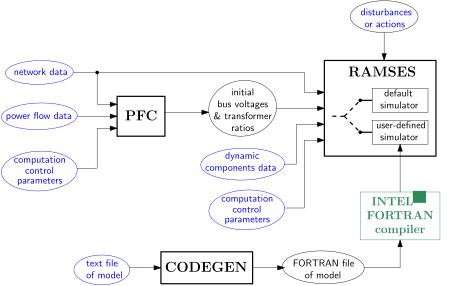
In the figure above, files shown in blue are provided by the user; those in black are produced internally.
| Module | Full Name | Description |
|---|---|---|
| Helios | AC Power Flow | Determines the initial operating point using the Newton-Raphson method in polar coordinates. Computes bus voltage magnitudes and phase angles, with optional transformer ratio adjustment. |
| RAMSES | RApid Multithreaded Simulation of Electric power Systems | Simulates the dynamic evolution of the power system in response to disturbances. Supports Backward Euler, Trapezoidal, and BDF2 integration methods. Exploits OpenMP parallelism. |
| CODEGEN | CODE GENerator | Translates user-defined models from text descriptions into Fortran 2003 code for compilation and linking with RAMSES. Supports excitation controllers, torque controllers, injectors, and two-port components. |
Each module can be used independently:
- Helios alone: Run a power flow computation to inspect the system state and/or save the solution for RAMSES
- Helios alone: Run a sequence of power flow computations until obtaining the desired system state, then save the solution for RAMSES
- RAMSES alone: With a pre-computed power flow solution, run multiple dynamic simulations from the same initial state
- CODEGEN alone: Build and save models for future incorporation into a user-defined version of RAMSES
Two Editions
Section titled “Two Editions”STEPSS is the name of the platform, not of any one program. It reaches users in two editions, which drive the same engines and read the same data files:
| Edition | Distributed as | Use it for |
|---|---|---|
| STEPSS GUI | a desktop application: an installer for Windows, macOS or Linux | Interactive work: load a network, run it, plot curves, build models |
| STEPSS in Python | the stepss package, pip install stepss | Scripting, parameter sweeps, and the scientific Python stack |
Neither edition wraps the other. Both are front ends onto the same Fortran engines, so a case built in one runs unchanged in the other.
They do not carry identical toolchains. The GUI bundles all three modules plus
the DYNGRAPH trajectory extractor. stepss bundles RAMSES and Helios,
so CODEGEN is the one capability it lacks: writing your own models needs the
GUI, or the CODEGEN toolchain directly.
Trajectory viewing exists in both, by different means. The GUI launches
DYNGRAPH, a separate viewer executable. STEPSS in Python carries its own
equivalent, written in Python on top of Matplotlib: extractor reads a .trj
file into NumPy arrays and curplot, or a curve’s own .plot(), draws them.
The curves stay in the process as ordinary arrays, so they can be sliced,
compared across runs, or passed to any other Python library.
Install either from Installation.
Helios Module
Section titled “Helios Module”The power flow computation uses the Newton-Raphson method in polar coordinates; see Power Flow for the complete record and parameter reference. Input data consists of:
- Network data (buses, lines, transformers, etc.)
- Power flow data specified at PV, PQ, and slack buses
- Control parameters (tolerances, reactive power limits, etc.), optional, defaults are used if not provided
Helios can optionally adjust transformer ratios to:
- Bring voltage magnitudes inside specified deadbands (in-phase transformers)
- Bring active power flows inside specified deadbands (phase-shifting transformers)
Helios produces an output file including:
- The voltage magnitudes and phase angles at all buses of the network
- The adjustable transformer data with updated values of their ratios
RAMSES Module
Section titled “RAMSES Module”RAMSES simulates the dynamic response of power system models under the phasor (RMS) approximation. It takes as input:
- Network data (shared with the power flow, with a few exceptions detailed in this documentation)
- Dynamic component data
- Solver control parameters (tolerances, time steps, reference speed, etc.)
- Sequence of disturbances and actions
Integration Methods
Section titled “Integration Methods”Three algebraization methods are available:
- Backward Euler:
- Trapezoidal:
- BDF2:
All three methods are implicit, ensuring numerical robustness. BDF2 is an -stable scheme allowing larger time steps when fast transients are not of interest.
Solver Acceleration
Section titled “Solver Acceleration”The solver was developed in response to the growing demand for simulations that last longer (e.g. Long-term stability studies) or involve larger models (e.g. To account for the impact of active distribution networks).
The solver achieves high computational efficiency through two techniques:
Parallel Processing: The power system model is decomposed into the network, injectors, and two-ports. A Schur-complement approach for network equations ensures the exact same solution as a non-decomposed scheme. Tasks distributed among threads include:
- Update and factorization of injector and two-port Jacobians
- Computation of the mismatch vector of Newton method
- Computation of injector contributions to the Schur-complement matrix
- Solution of local linear systems
The implementation is general: there is no hand-crafted optimization particular to the computer system, the power system, or the disturbance.
Localization: After a disturbance, components exhibit different levels of dynamic activity. This is exploited at each time step to:
- Skip Newton iterations on converged injectors/two-ports
- Replace latent (inactive) injectors with sensitivity-based models
A fast-to-compute metric is used to classify injectors, which seamlessly switch between categories according to their activity.
Key References
Section titled “Key References”- D. Fabozzi, A. Chieh, B. Haut, and T. Van Cutsem, “Accelerated and localized Newton schemes for faster dynamic simulation of large power systems,” IEEE Trans. On Power Systems, Vol. 28, No. 4, pp. 4936-4947, Dec. 2013. Doi: 10.1109/TPWRS.2013.2251915
- P. Aristidou, D. Fabozzi, and T. Van Cutsem, “Dynamic simulation of large-scale power systems using a parallel Schur-complement-based decomposition method,” IEEE Trans. On Parallel and Distributed Systems, Vol. 25, No. 10, pp. 2561-2570, Oct. 2014. Doi: 10.1109/TPDS.2013.252
CODEGEN Module
Section titled “CODEGEN Module”CODEGEN allows incorporating user-defined models in RAMSES. The user describes a model in a text file, and CODEGEN translates it into Fortran 2003 code for compilation and linking.
Four types of user-defined models are supported:
- Excitation controllers (EXC): excitation system and automatic voltage regulator
- Torque controllers (TOR): turbine and speed governor
- Injectors (INJ): components connected to a single AC bus
- Two-ports (TWOP): components connecting two buses
The user model is compiled, not interpreted, resulting in efficient number-crunching code. While the solver code is proprietary, the models are designed to be freely shared, making STEPSS an open-source simulation software for the modeling part.
CODEGEN Studio
Section titled “CODEGEN Studio”CODEGEN Studio is a browser-based visual editor for building CODEGEN models. Instead of writing DSL files by hand, you drag blocks onto a canvas, connect them, and export a valid model file. It can also import existing DSL files for visual inspection and editing.
Simulation Interfaces
Section titled “Simulation Interfaces”STEPSS modules are driven from STEPSS GUI or from Python through stepss. The Quick Start compares the two and gives the first steps for each.
Platform Support
Section titled “Platform Support”| Feature | Details |
|---|---|
| STEPSS GUI | Windows, Linux and macOS (Apple Silicon), Java bundled |
| stepss | Windows, Linux and macOS (Apple Silicon), Python 3.x |
| Command-line executables | Windows, Linux and macOS (Apple Silicon) for ramses, helios, codegen and dyngraph |
| Custom model compilation | gfortran, GNU make and OpenBLAS (MSYS2 on Windows) |
| Free version limits | 1000 buses max, 2 OpenMP cores |
Next Steps
Section titled “Next Steps”- Installation, Set up STEPSS on your system
- Quick Start, Run your first simulation
- License, Terms and the free-version limits above
- Publications, Papers describing the methods used here
- Repositories, Source for every STEPSS component